Free tool
Convert sheet music to Tonic Solfa
Have the staff notation but read from solfa? Bring the music in as a file or play it in, and NoteFusion writes the same tune in Tonic Solfa, with doh where the key puts it.
Or paste a song link
Links work for many songs, not all: YouTube sometimes blocks our downloads. If yours fails, upload the audio file instead.
Your first 30 seconds right here, with no account; an uploaded file is cut to its first 30 seconds. Create a free account for 3 full transcriptions every week, saved to your library.
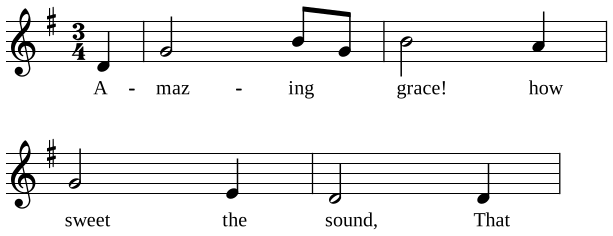
Amazing Grace
| s,A-- | dmaz----mingd_ | mgrace!---rhow- | dsweet---l,the- | s,sound,---s,That- |
Three ways to convert it
- From a file: a MusicXML, MIDI or ABC file, the kind MuseScore, Sibelius, Finale and Dorico export and many hymn websites offer. In the NoteFusion Android app, open Record, then Import, and choose the file. NoteFusion reads the notes straight from the score, so the solfa is exact; it counts as one of your transcriptions.
- From printed music or a PDF: play it on a keyboard or sing it into the recorder above, and NoteFusion writes the solfa from what it hears. It doesn't read photos or PDFs of sheet music.
- From our hymnal: over 250 hymns with their words, and over 500 more hymn tunes, are already written out in Tonic Solfa beside their staff notation. Find yours in the hymns.
Find the doh from the key signature
Converting by hand starts here: the key signature tells you which note is doh. With sharps, the last sharp is te, so doh is the note a semitone above it. With flats, the last flat but one is doh (with one flat, doh is F).
| Key signature | Doh (major) | Lah (minor) |
|---|---|---|
| No sharps or flats | C | A |
| 1 sharp | G | E |
| 2 sharps | D | B |
| 3 sharps | A | F♯ |
| 4 sharps | E | C♯ |
| 5 sharps | B | G♯ |
| 6 sharps | F♯ | D♯ |
| 1 flat | F | D |
| 2 flats | B♭ | G |
| 3 flats | E♭ | C |
| 4 flats | A♭ | F |
| 5 flats | D♭ | B♭ |
| 6 flats | G♭ | E♭ |
A tune in a minor key keeps the same doh as its relative major and is read la-based: it centres on lah, the note in the last column. From there, count up the scale: d r m f s l t d'. A sharpened note becomes de, re, fe, se or le; a flattened one ra, ma, sa, la or ta.
Then the rhythm
In Tonic Solfa a bar line is |, a beat begins at :, a note held on is -, and a beat split in two is written with a full stop between the halves: d.r. NoteFusion writes all of it for you, and the staff notation stays under the solfa so you can check one against the other.
Questions
Can I convert a PDF of sheet music to Tonic Solfa?
Not by reading the PDF itself. Play the music on a keyboard or sing it into NoteFusion and it writes the solfa from what it hears, or open the score in MuseScore (or the program it was made in) and export it as MusicXML, then import that file in the NoteFusion Android app.
Is the solfa from a file exact?
Yes. From a MusicXML, MIDI or ABC file NoteFusion reads the written notes and rhythm directly, so nothing is guessed from a recording; it then names each note from the key.
How is a minor key written in Tonic Solfa?
La-based: a minor key keeps the doh of its relative major and the tune centres on lah. A tune in A minor reads l, t, d, with doh on C. NoteFusion writes minor keys this way.
Where do I import a file?
In the NoteFusion Android app: open Record, then Import, and choose a MusicXML (.musicxml, .xml, .mxl), MIDI (.mid) or ABC (.abc) file.
More free tools
- Tonic Solfa converter Any song or recording written out in solfa, in its key.
- Hum to sheet music A hummed or sung tune as staff notation and solfa.
- YouTube to sheet music A song's melody from a link, as sheet music and solfa.
- Tonic Solfa of worship songs Any praise and worship song in solfa, in your key.
- Hum to find a hymn Hum a few bars and find which hymn it is.
Guides
- How to Read Staff Notation from Solfa: A Choir Guide
- Key Signatures Explained for Singers Using Tonic Solfa
- La-Based Minor in Tonic Solfa: The Choir Guide
- Fe Se Ta in Tonic Solfa: Chromatic Notes Explained
- Mastering Tonic Solfa Rhythm: Beats, Dashes and Timing
- Tonic Solfa vs Staff Notation: Which to Learn?