Free tool
Convert any song to Tonic Solfa
Sing it, hum it, upload the recording or paste a song link. NoteFusion listens, finds the doh and writes the tune out in Tonic Solfa, with the staff notation under it.
Or paste a song link
Links work for many songs, not all: YouTube sometimes blocks our downloads. If yours fails, upload the audio file instead.
Your first 30 seconds right here, with no account; an uploaded file is cut to its first 30 seconds. Create a free account for 3 full transcriptions every week, saved to your library.
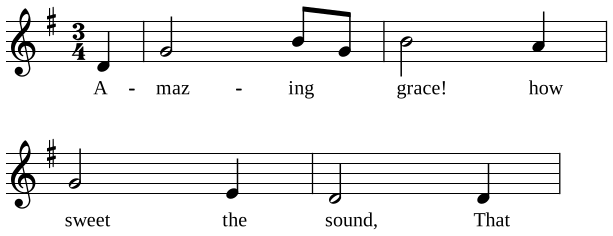
Amazing Grace
| s,A-- | dmaz----mingd_ | mgrace!---rhow- | dsweet---l,the- | s,sound,---s,That- |
How to convert a song to Tonic Solfa
- Bring the tune in. Record yourself singing or humming it, upload a recording from your phone, or paste a YouTube, Spotify or Apple Music link. The first 30 seconds work right here, with no account.
- NoteFusion writes it out. It hears the notes and how long each is held, finds the key and puts doh where the key says, then writes the tune in bars with its time signature.
- Check it and use it. Play it back, correct a note, move the doh if your hymn book has it elsewhere, transpose it for your choir, and download a PDF to print or share.
Solfa the way a hymn book writes it
- Movable doh. Doh is the key note, in every one of the 24 keys: in G major doh is G, in B♭ doh is B♭, and the sheet says which at the top.
- La-based minor. A tune in A minor reads l, t, d with doh on C, as tonic solfa singers learn it.
- Chromatic notes named for where they go: de, re, fe, se and le on the way up; ra, ma, sa, la and ta on the way down.
- Octave marks on every note: d' above, s, below, so nobody guesses the register.
- Staff notation of the same notes under the solfa, for the pianist and the instrumentalists.
Not sure which doh it is? When a tune could sit in more than one key, NoteFusion says so and lets you choose, instead of guessing.
What converts well
- One voice or one instrument, sung or played clearly: a hummed tune, a soloist, a keyboard melody.
- A song with a band. The singer is separated from the instruments first, then written out. This needs Pro or a song bought on its own.
- A choir singing in parts. Choir mode writes soprano, alto, tenor and bass as separate lines.
Dense mixes, very fast runs and a voice buried under loud instruments come out less cleanly. Sing on "la" or the words, steadily, in a quiet room, and the solfa comes out close to what you meant.
What is free
Your first 30 seconds on this page need no account. A free account gives you 3 full transcriptions every week, of anything you record or upload (a file is read for its first three minutes), with no card. Whole songs from a link, and recordings with a band, need Pro, or you can buy just that one song. There are no ads in the app.
Questions
Can I convert a song to Tonic Solfa for free?
Yes. Try 30 seconds here with no account, then create a free account for 3 full transcriptions every week. Anything you hum, sing, play or upload counts; whole songs from a YouTube or Spotify link need Pro or a single-song purchase.
Does it work for worship songs and hymns?
Yes. Sing or play the song, or upload a recording of your church singing it, and you get its solfa in the key it was sung in. For over 250 hymns we have already written the solfa out, with the words: browse them at notefusion.studio/hymns.
Which doh does it use?
Movable doh: doh is the key note of the key the tune is in, and minor keys are la-based. If the tune could be read in more than one key, NoteFusion offers the likely dohs and you choose. You can also move the key afterwards; the solfa stays the same and only the staff moves.
Can it convert staff notation to Tonic Solfa?
Yes, from a MusicXML, MIDI or ABC file in the Android app (Record, then Import). For printed music or a PDF, play or sing it in. See the sheet music to Tonic Solfa page for the details and a key-to-doh chart.
Do I need to install anything?
No. Everything works in the browser at notefusion.studio/app. The Android app does the same with the same account, and keeps your sheets on the phone for when you are offline.
More free tools
- Hum to sheet music A hummed or sung tune as staff notation and solfa.
- YouTube to sheet music A song's melody from a link, as sheet music and solfa.
- Sheet music to Tonic Solfa Staff notation, from a file or played in, rewritten in solfa.
- Tonic Solfa of worship songs Any praise and worship song in solfa, in your key.
- Hum to find a hymn Hum a few bars and find which hymn it is.