Any tune, written out in Tonic Solfa.
Hum a tune, record your choir or upload a recording, free. NoteFusion writes it out as movable-do solfa and staff notation; Pro adds alto, tenor and bass for your choir.
Or paste a song link
Links work for many songs, not all: YouTube sometimes blocks our downloads. If yours fails, upload the audio file instead.
30-second preview, no account needed; an uploaded file is cut to its first 30 seconds. Create a free account to keep the sheet, hear it in four parts and share it with your choir.
 Also on Android, with the same account.
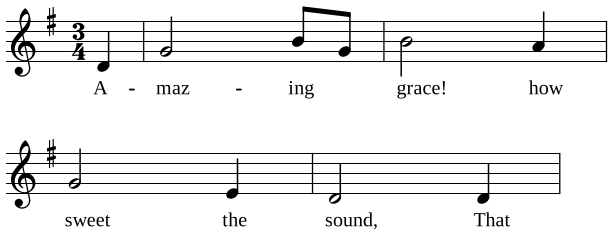
Amazing Grace
| s,A-- | dmaz----mingd_ | mgrace!---rhow- | dsweet---l,the- | s,sound,---s,That- |
Silent Night
| sSi---llentsnight,- | m_----- | sho---llysnight,- | m_----- |

In the Hall of the Mountain King
| l,t,drmdm- |

How it works
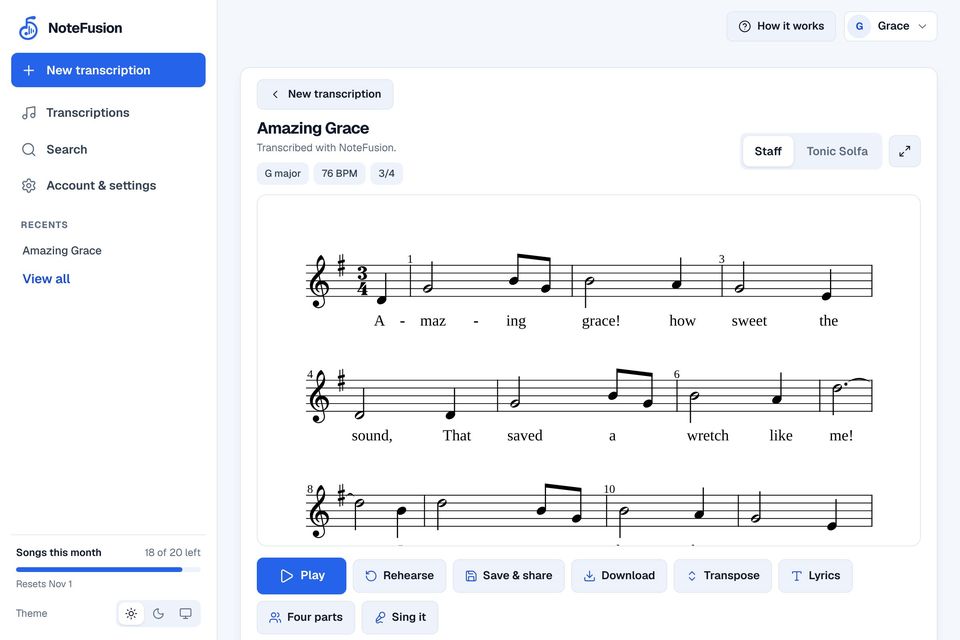
Hum, record or upload
A tune hummed into the mic, a recording of your choir, or a file from your device. You can paste a song link too.
Get the sheet
The lead voice is isolated and written out: Tonic Solfa, staff notation, key and tempo, and on Pro alto, tenor and bass under it when you ask.
Rehearse, transpose, share
Play it back, mute your part and sing against the others, move the key to suit your singers, and send the choir a link.
Movable-do, done properly
Most tools stop at a stave. NoteFusion names every note from the key it hears, so the sheet is ready for choirs and singers who read Tonic Solfa.
- Doh follows the key across all 24 keys, major and minor.
- La-based minor. A minor reads l t d, with doh on C.
- Chromatic syllables named the hymn-book way: de, ra, fe, se, ta.
- Octave marks on every note, so the register is never in doubt.
Change the key
Doh is D
| Solfa | d | d | r | m | f | m | r | – |
|---|---|---|---|---|---|---|---|---|
| Notes | D | D | E | F♯ | G | F♯ | E | – |
The solfa your singers read stays the same in every key. Only doh moves, and the notes under it.
What you get
Everything a choir needs to go from a recording to a rehearsal.
- Songs from a link Pro
- Paste a YouTube, Spotify or Apple Music link. We fetch the audio, isolate the lead vocal from the band and write it out, with the song credited on the sheet. Links work for many songs but not all; uploading the audio always works.
- Made for voices
- Hum it, sing it or upload it. Scoops, vibrato and a line sung a little sharp come out as the notes you meant, not a scatter of accidentals.
- Four-part harmony Pro
- Alto, tenor and bass written under the tune the way a hymn arranger would. Play all four, or mute your part and sing it against the others.
- Transpose for your choir
- Move the piece a semitone at a time and see at once whether each part still sits in your singers’ range. The solfa reads exactly as before.
- Share and download
- Lyrics under the notes, a link anyone in the choir can open and rehearse from, and PDF, MusicXML and MIDI.
- Sing it back Pro
- Record a take of your part and get every note marked in tune, close or wrong.
Pricing
Free to start. Pro adds whole songs, four-part harmony and every download.
Loading prices…
Prices are shown for your region. Leading a choir? One choir plan makes you and up to 25 singers Pro: see the choir plan. Payments are taken on our payment provider's secure checkout page; we never see your card details. Read our terms of service and how refunds work, or email hello@notefusion.studio.
Questions
Something else? Email hello@notefusion.studio.
Do I need to read music to use NoteFusion?
No. That is the point of Tonic Solfa: if you can sing doh, re, mi, you can read and teach what NoteFusion gives you. The staff notation is there for instrumentalists and choir directors who prefer standard notation.
How accurate is the transcription?
A clear hummed or sung line, or a single instrument in a quiet room, comes out close to note-perfect. A full song from a link depends on how cleanly the lead vocal separates from the band: solo voices and hymns are excellent, dense mixes less so. Where notes may need a check, the sheet says so.
What happens to my voice recordings?
Your audio is transcribed and then permanently deleted from our servers as soon as the job finishes. No person listens to your recordings, and your audio is never stored or used to train third-party models. See our privacy policy.
Can I change the key after transcribing?
Yes, instantly. Changing the key only moves doh: the notes are relabelled, nothing is transcribed again.
Do I need the app, or does it work in the browser?
Everything works in the browser at notefusion.studio/app: links, uploads, recording, the four parts, rehearsal playback, transposing, sharing and downloads. The Android app adds recording in the rehearsal room and an offline library, and uses the same account.
What does Pro include?
Whole songs from a link (up to six minutes, twenty a month), alto, tenor and bass written under any tune when you ask, sing-along marking, clean PDF, MusicXML and MIDI downloads, and the fast lane, so your job never waits behind someone else’s. Free accounts get 3 hummed or recorded transcriptions every week (back every Friday at 17:00 UTC; the app shows when in your own time), and the sheets they can save and share.
Who owns my transcriptions and notation?
You own everything you transcribe. Your library is encrypted and private to your account. You can export your sheet music as MusicXML or PDF whenever you choose.
How can I permanently delete my account or data?
At any time, in the mobile app (Settings, Account, Delete Account) or on the web at notefusion.studio/delete-account.
From the blog
All posts- Choir Choir Director Checklist Before Sunday Service Prepare your choir for Sunday worship with this practical checklist covering song selection, comfortable keys, score copies, and rehearsal routines. 2 November 2026 · 11 min read
- Choir How to Transpose a Song for a Choir Learn how to transpose a song for a choir step by step. Use Tonic Solfa to keep singing simple while checking ranges and coordinating accompanists. 29 October 2026 · 10 min read
- Choir How to Sing a Descant: A Soprano's Practical Guide Learn how to sing a descant with confidence. Discover how descants work, who should sing them, and how to practise them against the hymn tune. 28 October 2026 · 9 min read
Get your next chorus written down.
Free to start, no card needed. Hum it, record it or upload it, get the solfa, and have the choir singing it this week.