Guide
How to convert a song to Tonic Solfa
The short answer
Find the song's key note and call it doh. Name every note of the melody by its step in the scale (d r m f s l t), mark the notes above or below that octave, and set the rhythm in bars with a colon before each beat. Or let NoteFusion do it: hum the tune, upload the song, paste its YouTube, Spotify or Apple Music link, or photograph the sheet music, and it writes the Tonic Solfa and the staff notation for you.
By hand, in six steps
- Get the melody. Sing it, play it on a keyboard, or read it from sheet music: you need the tune itself, not the chords.
- Find the key note, and call it doh. Most tunes end on their key note. On sheet music, the key signature tells you. If the tune is minor and ends on lah, doh is a minor third above it.
- Name each note from doh. Count each note's step up from doh: d r m f s l t. A note a semitone off the scale is a chromatic: fe, se, ta, ma.
- Mark the octave. Mark notes above te as high (d′) and notes below doh as low (s,).
- Write the rhythm. Draw a bar line for each bar and a colon before each beat; a dot halves a beat, a dash holds the note on.
- Sing it back. Sing the solfa against doh on a keyboard. Where it sounds wrong, the note or the doh is wrong.
In seconds, with NoteFusion
NoteFusion writes the solfa for you in the browser at notefusion.studio/app or in the Android app:
- Sing, hum or play the tune into your phone or computer.
- Upload a recording of the song. With a band behind the singer, the voice is separated from the instruments first.
- Paste a link from YouTube, Spotify or Apple Music and choose the part of the song you want.
- Photograph or upload sheet music (a photo or a PDF) to turn staff notation into solfa.
It finds the doh, writes every note in movable-doh Tonic Solfa the way a hymn book prints it (la-based minor, chromatics, octave marks, bars), and puts the staff notation under it. If two dohs fit the tune, it asks which one your choir sings. You can change the key, fix a note, add alto, tenor and bass, and download a PDF.
Try it below: the first 30 seconds need no account.
Or paste a song link
Links work for many songs, not all: YouTube sometimes blocks our downloads. If yours fails, upload the audio file instead.
Your first 30 seconds right here, with no account; an uploaded file is cut to its first 30 seconds. Create a free account for 1 full transcription, then 1 every week, saved to your library.
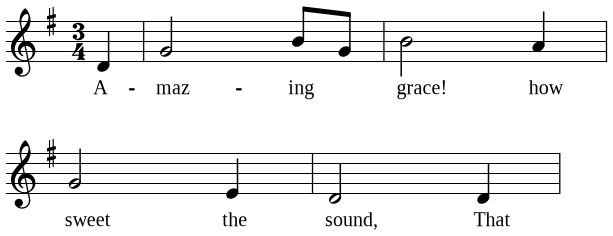
Amazing Grace
| s,A-- | dmaz----mingd_ | mgrace!---rhow- | dsweet---l,the- | s,sound,---s,That- |
Questions
Can I convert a YouTube song to Tonic Solfa?
Yes. Paste the YouTube link into NoteFusion, pick the part of the song you want, and it separates the singer from the band and writes the melody in Tonic Solfa and staff notation. Spotify and Apple Music links work too.
Is it free?
The first 30 seconds on the website need no account. A free account gets one full transcription with everything Pro has, then one a week of anything you sing, hum, play or upload (its first minute), with no card. Whole songs from links need Pro, or one song bought on its own.
What if the doh is wrong?
When two keys fit the tune, NoteFusion asks which doh it is and rewrites the solfa for your choice. You can also set the key yourself, and change it later without re-transcribing.
Can it write the alto, tenor and bass?
Yes. NoteFusion writes soprano, alto, tenor and bass under a tune on request, or reads a recording of a choir part by part.
More guides
- What is Tonic Solfa? Tonic Solfa writes music with the syllables d r m f s l t, doh always the key note.
- Tonic Solfa vs staff notation Tonic Solfa and staff notation side by side.
- Tonic Solfa apps Which music apps write Tonic Solfa? What to look for in one (movable doh, la-based minor, chromatics, octave marks) and how the transcription apps compare..
Written by the NoteFusion team, 17 November 2026.