With Pro
See your singing in Tonic Solfa, live
Sing into your phone or laptop and watch each note appear in Tonic Solfa the moment you sing it, with how close to the note you are. Part of Pro, in the NoteFusion web app, and nothing is recorded.
Live Tonic Solfa is part of Pro: up to 3 minutes a session and 30 minutes a day. Your singing is read on your device and never recorded or sent.
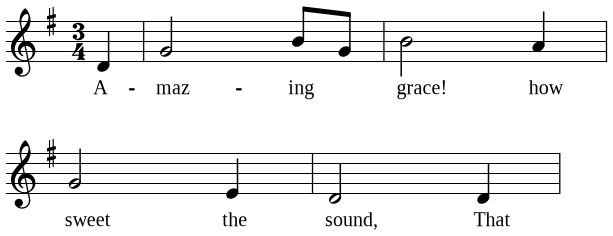
Amazing Grace
| s,A-- | dmaz----mingd_ | mgrace!---rhow- | dsweet---l,the- | s,sound,---s,That- |
How to use Live Tonic Solfa
- Open it in the NoteFusion web app (Pro), press Start and allow the microphone. The sound is read on your device and thrown away; nothing is recorded or sent.
- Sing your doh and hold it for a moment, or choose the doh from the list if you know the key. A sung doh also sets your own tuning, so a choir that sits a little under concert pitch is read in tune.
- Sing. The big letter is the note you are on, the needle shows where it sits on the modulator, and the word under it says whether you are in tune. Each note you hold is written into the line below, and a held note gets a dash.
- Copy the line to keep it, or press Clear and start again. A session stops by itself after 3 minutes; press Start to go on.
What it is good for
- Learning solfa by ear. Sing a scale, an interval or a phrase and see its names straight away, the same names a hymn book prints.
- Checking your pitch. The needle and the word under the syllable show whether a note is in tune, sharp or flat, while you hold it.
- Teaching a choir. Put it on a screen in rehearsal: a section sings a line and everyone sees what they sang.
- Catching a tune in your head before it goes: hum it and copy the solfa.
The names are NoteFusion's own
Each note is named by the same solfa engine that writes every NoteFusion sheet: movable doh, a sharpened or flattened note named for where it goes (fe on the way up to soh, ta on the way down to lah), and the octave marks where a hymn book puts them. A note can change its name a moment after you sing it, when the next note shows which way it went.
Honest limits
- One voice, one note at a time. It follows a single line; a chord or two singers at once is not read.
- Notes, not rhythm. It writes which notes you sang, not their beats or the bars. For a whole song written out with its rhythm, bars and key, transcribe it in NoteFusion.
- A quiet room helps. Background music or talking can be heard as notes. Headphones are not needed.
- A browser with a microphone. It works in Chrome, Edge, Firefox and Safari on phones and computers.
- Up to 30 minutes a day. Each session runs up to 3 minutes, and Pro members get 30 minutes of live listening a day, back at midnight in their own time.
Questions
Is Live Tonic Solfa free?
No, it is part of NoteFusion Pro, in the web app. A session runs up to 3 minutes and you get 30 minutes a day. Nothing you sing is recorded or sent anywhere: the sound is read on your device, a moment at a time.
How does it know my doh?
Sing your doh first and hold it for half a second; that note becomes doh, and its tuning becomes yours. If you know the key, choose the doh from the list instead.
Does it write the rhythm and the bars?
No, it writes the notes you sing as you sing them. To get a whole song in Tonic Solfa and staff notation with its rhythm, bars and key, record or upload it in NoteFusion.
Why did a note change its name?
A note between two scale notes is named for where it goes, as a hymn book names it: fe if it rises to soh, ma if it falls to ray. Until you sing the next note, it shows the likelier name.
Can I use it to check if I am singing in tune?
Yes. While you hold a note, the word under the syllable says In tune, a little sharp or flat, with how many cents off you are, measured from your own doh.
More free tools
- Tonic Solfa converter Any song or recording written out in solfa, in its key.
- Hum to sheet music A hummed or sung tune as staff notation and solfa.
- YouTube to sheet music A song's melody from a link, as sheet music and solfa.
- Sheet music to Tonic Solfa A photo or PDF of staff notation, or a score file, rewritten in solfa.
- Tonic Solfa of worship songs Any praise and worship song in solfa, in your key.
- Hum to find a hymn Hum a few bars and find which hymn it is.
With Pro
- Backing track maker A song’s band without the singer, to rehearse over. The MP3 download is Pro.