With Pro
Turn a song into a backing track
Upload a song and NoteFusion lifts the singer out of it. What is left is the band: a backing track that plays under the song’s Tonic Solfa while you rehearse, and downloads as an MP3 with Pro.
A free account’s first transcription can be a song with its band, so you hear the backing under the solfa before you pay. Downloading it as an MP3 is part of Pro.
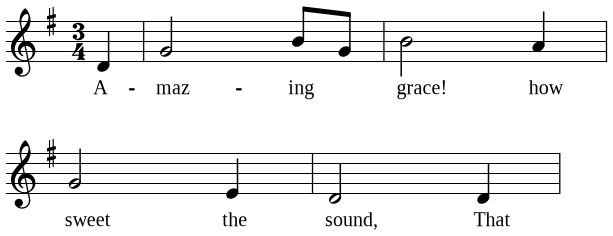
Amazing Grace
| s,A-- | dmaz----mingd_ | mgrace!---rhow- | dsweet---l,the- | s,sound,---s,That- |
Can I remove the vocals from a song and keep the instrumental?
Yes. Upload the song to NoteFusion and choose “Voice with instruments”. It separates the singer from the band, writes the singer’s tune out in Tonic Solfa and staff notation, and keeps what is left, the band without the lead voice, as the song’s backing. Singers also call this an instrumental, a karaoke track or, in Nigeria, a freebeat. The backing plays under the solfa in the app, and Pro members download it as an MP3.
How to make a backing track from a song
- Upload the song. In the app, upload the recording from your phone or computer (MP3, WAV, M4A, FLAC or OGG, up to 25 MB), then choose “Voice with instruments”.
- NoteFusion separates it. The singer is lifted out and written down as solfa and staff; the band is kept as the backing. A song is read for up to six minutes.
- Rehearse over it. Press Play: the band plays quietly under the solfa, in time with it. The Song backing switch turns it on or off, and the Solfa and Backing balance sets how loud each is.
- Download it. With Pro, open Download in the web app (Export in the Android app) and choose the backing track. It saves as an MP3 named after your sheet.
What you get
- The band without the lead voice, as one MP3 file you can play in any music app, send to your choir or sing over.
- The tune beside it. The same upload gives you the singer’s line in Tonic Solfa and on the staff, in the song’s key, so you can see what to sing while the band plays.
- Kept with your sheet. The backing stays in your library with the sheet for as long as you keep the sheet, and goes when you delete it.
Honest limits
- Your own uploads only. A song brought in from a YouTube, Spotify or Apple Music link plays its backing while its sheet is open, but that backing is never kept and cannot be downloaded.
- Rehearsal quality. The MP3 is mono and small (about 2 MB for a six-minute song). It is made for practising and for leading a rehearsal, not for a studio release.
- It is the same recording with the voice taken out. A trace of the lead singer can remain, and backing singers usually stay with the band.
- It stays in the song’s key. You can transpose the sheet for your choir, but the backing cannot move with it, so it is switched off while the sheet is transposed, and the download is always in the key the song was recorded in.
- Use recordings you have the right to use. A backing made from someone else’s song is still their recording.
What is free and what is Pro
A free account starts with 1 transcription that has everything Pro has, a song with its band included: you get the solfa, the staff and the backing playing under them. After that, songs with a band need Pro, or you can buy just that one song. Downloading the backing as an MP3 is part of Pro, along with MusicXML and MIDI.
Questions
How do I remove the vocals from a song?
Upload the song in NoteFusion (notefusion.studio/app, or the Android app) and choose “Voice with instruments”. NoteFusion separates the singer from the band, writes the tune in Tonic Solfa and staff notation, and keeps the band without the lead voice as the song’s backing track.
Is the backing track maker free?
Hearing it is free once: a free account’s first transcription can be a song with its band, and its backing plays under the solfa. Downloading the backing as an MP3 is part of Pro.
Can I download the instrumental of a YouTube song?
No. A song from a YouTube, Spotify or Apple Music link plays its backing while its sheet is open, but that backing is never kept or downloaded. The download is for recordings you upload yourself.
What quality is the MP3?
It is a small mono MP3, about 2 MB for a six-minute song, made for practice and rehearsal rather than a studio release. A trace of the lead voice can remain, and backing singers usually stay with the band.
Can I change the key of the backing track?
Not yet. The backing stays in the key the song was recorded in. You can transpose the sheet for your choir, and the backing is switched off while the sheet is in another key.
Does it work on a phone?
Yes. The web app works in a phone’s browser, and the Android app does the same with the same account. On Android the backing is shared from Export, so you can save it or send it to another app.
More free tools
- Tonic Solfa converter Any song or recording written out in solfa, in its key.
- Hum to sheet music A hummed or sung tune as staff notation and solfa.
- YouTube to sheet music A song's melody from a link, as sheet music and solfa.
- Sheet music to Tonic Solfa A photo or PDF of staff notation, or a score file, rewritten in solfa.
- Tonic Solfa of worship songs Any praise and worship song in solfa, in your key.
- Hum to find a hymn Hum a few bars and find which hymn it is.
With Pro
- Live Tonic Solfa Each note you sing named in solfa as you sing it, with a tuning needle. Pro.